Skip to content
Runs locally · Files never uploaded

GLB tools for low poly 3D models

Inspect, simplify, compress, align and build LODs for GLBs, or convert OBJ, STL and FBX to GLB. Browser tools keep your files on your device.

Browser GLB suite

Inspect, edit and convert 3D models in one browser tab

Open a static GLB or convert an OBJ, STL or FBX first. Carry the model between tools without uploading your file.

AI 3D workbench

AI 3D generator

Generate a textured low poly GLB from one reference image or a short text prompt at a chosen triangle budget (1,500–6,000), then refine it in the Polygon reducer.

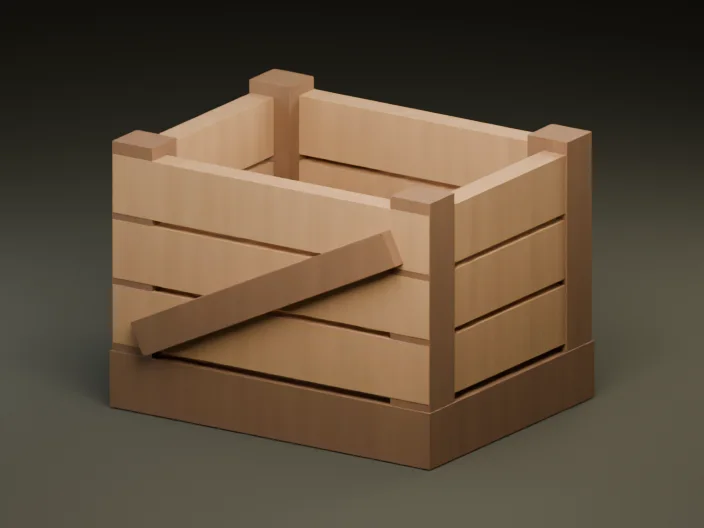
Textured wooden crate GLB from the model library
GLB · Textured prop · Direct handoff to Polygon reducer
Shared tab session

A clean pipeline from raw GLB to engine-ready prop

Each browser tool shares your active GLB in memory so you can move step by step before downloading.

  1. 01

    Inspect mesh & textures

    Audit triangle counts, embedded images, UV attributes, and meter bounds.

  2. 02

    Reduce polygon budget

    Trim triangles toward a target count or percentage while comparing silhouettes.

  3. 03

    Build LOD1–LOD3 ZIP

    Generate distance levels and export ready GLBs with a manifest.

  4. 04

    Set pivot & orientation

    Snap origin to ground center or apply ±90° axis turns before import.

  5. 05

    Compress & resize textures

    Apply Meshopt buffer encoding and WebP texture sizing before shipping.

Specs & Limits Comparison

Compare the browser 3D tools

Every tool runs locally in your browser Web Worker with hard 30 MiB and 250,000-triangle guardrails, zero server uploads, and no sign-up.

ToolInput / OutputHard limitsChanges triangles?Best for
Model inspectorStatic .glb → Read-only stats & 3D auditUp to 30 MiB · 250,000 trisNo (non-destructive)Auditing triangles, bounds (m), materials, UVs, and external URIs
Polygon reducerStatic .glb → Decimated .glbUp to 30 MiB · 4–250,000 trisYes (meshoptimizer, border-locked)Trimming dense props or AI-generated meshes to a target triangle budget
LOD generatorStatic .glb → LOD0–LOD3 .glb + manifest.json ZIPUp to 30 MiB · 5–250,000 trisYes (each LOD built from LOD0)Generating distance LOD chains for Godot VisibilityRange or Unity LODGroup
Pivot and rotationStatic .glb → Re-centered / rotated .glbUp to 30 MiB · 250,000 trisNo (root transform only)Snapping ground-center origins, click-picking pivots, and fixing Z-up exports
GLB compressorStatic .glb → Meshopt / Quantized + WebP .glbUp to 30 MiB · 250,000 trisNo (same triangle count)Cutting GLB download bytes with EXT_meshopt_compression and 512–2048 px WebP
GLB ↔ OBJ converterStatic .glb ↔ .obj + .mtl + PNG/JPEGUp to 30 MiB total · 250,000 trisTriangulates OBJ facesMoving static props between Wavefront OBJ and self-contained GLB
STL to GLB converterASCII or binary .stl → Static .glbUp to 30 MiB · 250,000 trisOptional ground-center and reductionBringing 3D printing meshes into a meter-scale, Y-up scene
FBX to GLB converterUntextured static .fbx → Static .glbUp to 30 MiB · 250,000 trisBakes transforms and triangulates faces. Optional reductionMoving solid-color props from FBX into self-contained GLB

Shared browser limits & what the suite does NOT support

  • GLB input must be self-contained glTF 2.0 binary. External .bin buffers and texture URIs cannot be edited. Model Inspector can read the GLB header.
  • Hard browser guardrails: 30 MiB maximum input size and 250,000 maximum triangles per scene so the browser workers can process files within a bounded workload.
  • No skeletal skins, keyframe animations, or morph targets. Rigged characters should be decimated or re-pivoted in Blender before export.
  • No pre-compressed extension inputs (such as Draco, Meshopt, or GPU instancing) on import—export an uncompressed static GLB first, then run Polygon Reducer or GLB Compressor as your final export step.
  • Use the format-specific converter for OBJ with one MTL and local PNG/JPEG textures, untextured static FBX, or STL.

Häufige Fragen

What are the file size and polygon limits across the browser GLB tools?

The tools support self-contained, uncompressed static GLBs up to 30 MiB and 250,000 triangles. OBJ, STL and FBX conversion use the same limits. Selected MTL and textures count toward the OBJ file size limit. Polygon Reducer requires at least 4 triangles and LOD Generator requires at least 5 triangles.

Are my 3D models uploaded to a server when I use these tools?

No. Parsing, meshoptimizer WebAssembly decimation, LOD ZIP packaging, pivot transforms, conversion, and Meshopt/WebP compression all run locally in your browser Web Worker. Files never leave your device.

In what order should I run Inspector, Reducer, Pivot, LODs, and Compressor?

Inspect first to check triangles, materials, and bounds; fix pivot and ±90° rotation next; run Polygon Reducer or LOD Generator if the mesh exceeds your scene budget; and run GLB Compressor last as your final export step.

Why can't I edit a GLB that is already Draco- or Meshopt-compressed?

The editing tools expect standard uncompressed glTF 2.0 binary (.glb) files so vertex welding, border-locked simplification, and re-quantization stay accurate. Model Inspector still reads header metadata safely for compressed files, and you can export an uncompressed static GLB from Blender before editing.

Do these browser tools support rigged, skinned, or animated GLBs?

No. The suite focuses on static game props and environment assets without skins, skeletal animations, or morph targets so UV seams, materials, and meter bounds stay verified end to end.

Do I need an account or paid plan to use the GLB tools?

No. The browser tools are free with no sign-in, no usage quotas, and no watermarks. Paid credits are only used for optional AI 3D generation or unlocking full themed asset packs.